
Private APN and IPsec MDM connectivity
Use this guide when an RC500 has cellular service on a private APN, static APN, or carrier-to-customer IPsec path, but stays offline or shows an old Last seen time in Telisky MDM.
This is almost always an upstream network design problem, not a missing IPsec tunnel on the router. The carrier or private-APN provider carries the SIM subnet to the customer edge. Your firewall or security team must then give that subnet controlled outbound access to Telisky services.
After this page, a network team should know:
- which destinations and ports the RC500 must reach
- why those destinations must be FQDN-based, not pinned IPs
- why ICMP or a carrier “connected” status is not proof of MDM access
- that browsing the router’s Local WebUI is a separate inbound flow from cloud check-in
Before you begin
Section titled “Before you begin”This guide assumes the private or static APN service already exists. Collect these values from the carrier and customer network team:
- Private SIM/APN source subnet or subnets
- Whether traffic reaches the customer edge through carrier IPsec, a private interconnect, or another managed breakout
- Customer-side IPsec peer, tunnel interface or zone, and traffic selectors when IPsec is used
- Internet egress interface and source-NAT policy
- DNS and NTP services configured on the deployed RC500s
- Carrier path-MTU or encapsulation details, when available
The IPsec termination and internet firewall may be separate systems or functions on the same appliance. The required packet flow is the same in either design. IKE proposals, credentials, lifetimes, and other tunnel-build parameters come from the private-APN provider; they are not configured on the RC500 for this design.
What “good cellular” does not guarantee
Section titled “What “good cellular” does not guarantee”These conditions can all be true while the router stays offline in MDM:
| Observation | What it actually means |
|---|---|
| Strong signal / correct operator | The radio can attach. It does not prove a usable data session or internet breakout. |
| Carrier portal shows a private or static SIM IP | Many portals show the provisioned address even when the router has no live bearer. Trust the router’s own Cellular status. |
| Upstream IPsec SA is established | The tunnel between carrier and customer may be healthy while the decrypted SIM subnet still has no DNS, NAT, or allowed Telisky destinations. |
| Ping to a public IP works | ICMP or a single probe path may be allowed while TCP 8883, TCP 443, DNS, or TLS still fails. |
| Local WebUI opens on the LAN | On-site access at http://192.168.4.1 does not prove the cellular path can reach Telisky. |
Cloud MDM only shows a router as online after the router successfully checks in. Factory-prepared and newly attached routers can therefore look “missing” until private-APN egress is correct.
Reference topology
Section titled “Reference topology”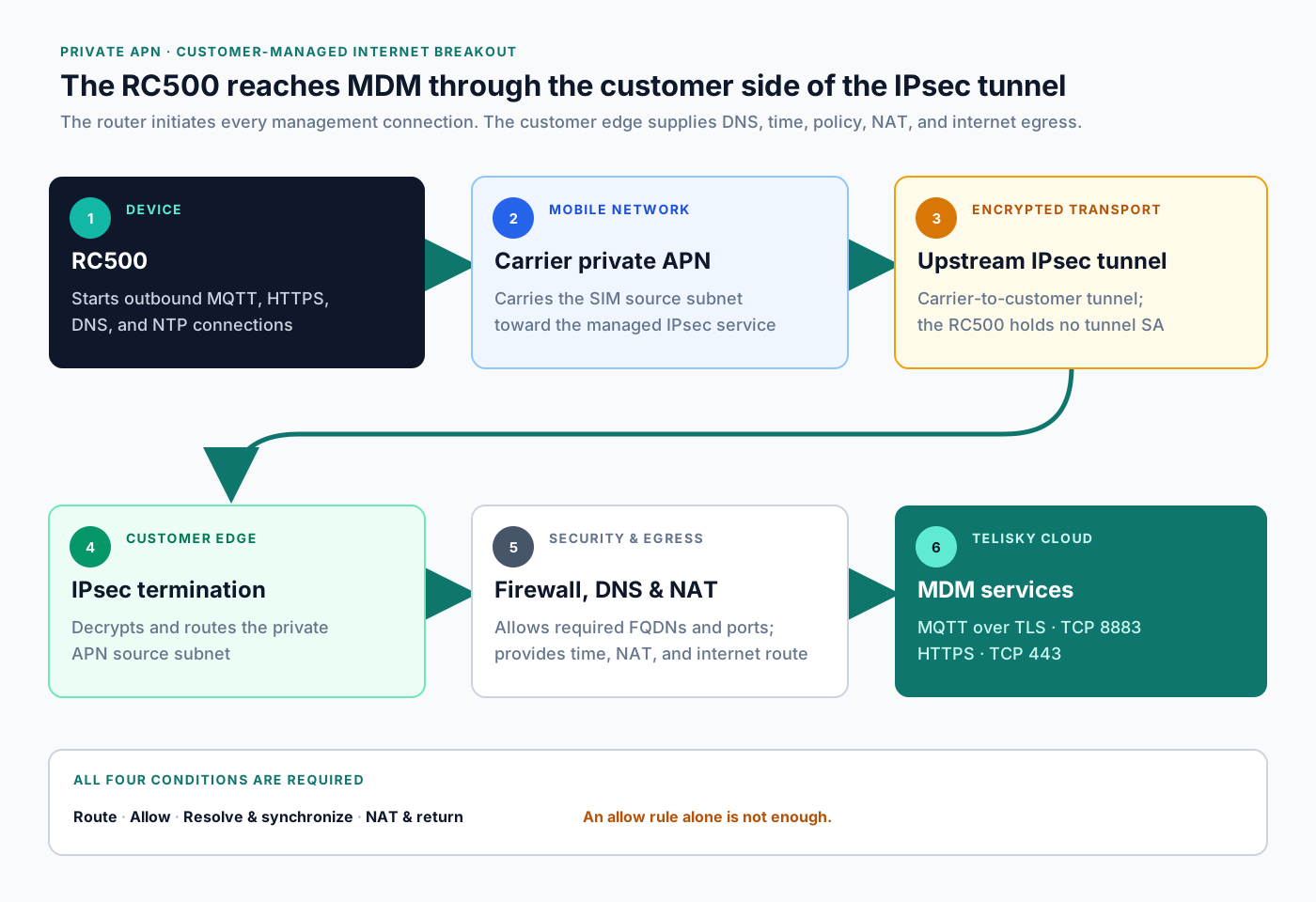
All four conditions below must be true:
- Route: the private SIM/APN subnet reaches the customer edge or breakout policy.
- Allow: the customer firewall permits the required destination FQDNs and ports.
- Resolve and synchronize: the RC500 can use DNS and obtain correct time for TLS validation.
- NAT and return: the customer edge provides source NAT when needed, internet routing, and stateful return traffic.
A firewall allow rule alone is not sufficient. If the private-APN subnet has no internet route or source NAT after decryption, the RC500 remains offline in MDM.
Required outbound access
Section titled “Required outbound access”Create rules from the RC500 private-APN/SIM subnet, not from the router’s LAN subnet.
Use FQDN-based destination objects. Do not hard-code the current resolved IP addresses. Several Telisky HTTPS names use Cloudflare or similar edge infrastructure whose addresses can change. A rule that worked last month can silently fail after a DNS change if the firewall pinned IPs.
Core MDM channel
Section titled “Core MDM channel”| Destination | Protocol and port | Requirement | Purpose |
|---|---|---|---|
ingest-mqtt.telisky.com | TCP 8883 | Required for check-in | Primary TLS MQTT check-in, telemetry, configuration, jobs, and command channel |
Outbound TCP 8883 is essential. Allowing HTTPS alone does not bring the router online in MDM.
First-ask HTTPS / OTA hosts
Section titled “First-ask HTTPS / OTA hosts”| Destination | Protocol and port | Requirement | Purpose |
|---|---|---|---|
mdm.telisky.com | TCP 443 | Required | MDM-hosted device and firmware services |
cloud.telisky.com | TCP 443 | Required | Telisky cloud and approved firmware services |
fleet.telisky.com | TCP 443 | Required | Fleet and approved firmware services |
ingest-mqtt.telisky.com | TCP 443 | Required | Also allowlisted for HTTPS OTA pulls |
These four names are the first carrier/firewall ask together with MQTT. Use FQDN objects for the whole set so OTA and related HTTPS pulls succeed after check-in.
Lifecycle and optional destinations
Section titled “Lifecycle and optional destinations”| Destination | Protocol and port | When needed |
|---|---|---|
mdm-api.telisky.com | TCP 443 | One-time or recovery device attachment from the router; not required for continuous check-in |
discovery.telisky.com | TCP 443 | Remote-support tunnel discovery only when that feature is used |
mdm-api.telisky.com is an attach/browser helper, not the ongoing management channel. Include it when installers will attach routers with a code; omit it from the minimum check-in allowlist if every router is pre-assigned and never uses attach.
discovery.telisky.com is deferred for ordinary check-in. Do not ask the carrier to allow a remote-support WireGuard destination by IP as part of first-turn MDM connectivity; discovery endpoints and hub addresses can change. Request that path later only if Telisky Support asks for it and supplies a stable destination.
Destination and port facts on this page track the firmware private-APN contract fixture fixtures/private_apn_guidance.contract.json (copied from ts-openwrt tests/fixtures/private_apn_guidance.contract.json). When firmware defaults change, refresh that fixture and keep this page aligned.
DNS and time
Section titled “DNS and time”| Service | Protocol and port | Current RC500 default | Alternative |
|---|---|---|---|
| DNS | UDP and TCP 53 | 8.8.8.8 and 1.1.1.1 | Configure and permit customer DNS resolvers that can resolve public Telisky names |
| NTP | UDP 123 | 0.openwrt.pool.ntp.org through 3.openwrt.pool.ntp.org | Configure and permit a reachable customer NTP service |
Permit DNS over both UDP and TCP. TCP is used for large responses and fallback. Correct time is required before normal TLS certificate validation can succeed.
If the private APN blocks public resolvers, point the routers at customer DNS that can still resolve the Telisky FQDNs above, then permit that resolver path from the SIM subnet.
Firewall and security policy
Section titled “Firewall and security policy”Configure the customer edge with these properties:
- Stateful outbound policy: allow replies to sessions initiated by the RC500.
- Source NAT: translate the private SIM/APN source when it exits to the public internet.
- Direct TLS: bypass HTTPS/TLS inspection for the Telisky FQDNs. The RC500 does not trust a certificate substituted by a customer firewall.
- Direct MQTT: permit TCP 8883 directly. MQTT is not HTTP and cannot use a normal explicit web proxy.
- FQDN refresh: ensure the firewall refreshes DNS-backed address objects when records change.
- No inbound exposure for MDM: normal cloud operation requires no unsolicited inbound connection to the RC500.
- Stable sessions: avoid unusually short TCP timeouts. The default MQTT keepalive is 60 seconds.
A practical vendor-neutral policy is:
Source zone:         Private APN / IPsecSource addresses:    <RC500-SIM-SUBNETS>Destination objects: ingest-mqtt.telisky.comService:             TCP/8883Action:              Allow, stateful, no TLS inspectionSource NAT:          Enabled at internet egress
Source zone:         Private APN / IPsecSource addresses:    <RC500-SIM-SUBNETS>Destination objects: mdm.telisky.com                     cloud.telisky.com                     fleet.telisky.com                     ingest-mqtt.telisky.comService:             TCP/443Action:              Allow, stateful, no TLS inspectionSource NAT:          Enabled at internet egress
# Optional when attach codes or remote-support discovery are used:# mdm-api.telisky.com TCP/443# discovery.telisky.com TCP/443
Source zone:         Private APN / IPsecSource addresses:    <RC500-SIM-SUBNETS>Destination:         Approved DNS and NTP servicesServices:            UDP+TCP/53, UDP/123Action:              Allow, stateful
IPsec and breakout options
Section titled “IPsec and breakout options”Full-tunnel internet breakout
Section titled “Full-tunnel internet breakout”Use this when all private-APN traffic is expected to exit through the customer network.
- The carrier routes the complete SIM/APN subnet through IPsec or the managed interconnect.
- The customer edge routes decrypted traffic toward its normal internet firewall.
- The internet firewall applies the FQDN policy and source NAT.
- Return traffic is restored by the NAT state and routed back into the APN path.
Restricted service breakout
Section titled “Restricted service breakout”Use this when the private APN should reach only approved services.
- Route only approved Telisky, DNS, and NTP traffic from the decrypted APN zone to internet egress.
- Deny other internet destinations from that zone.
- Preserve direct TCP connectivity; do not force MQTT through an HTTP proxy.
- Keep FQDN objects and resolver access current.
Air-gapped private APN
Section titled “Air-gapped private APN”A private APN with no internet breakout cannot connect to cloud MDM. The cellular session and upstream IPsec tunnel may both be healthy while the router remains offline in the portal.
Why ping can work when management does not
Section titled “Why ping can work when management does not”Private-APN paths often allow a narrow probe while blocking the management path customers actually need.
| What works | What still fails | Why |
|---|---|---|
| Ping to a public IP | MDM stays offline | ICMP is not MQTT. The router needs TCP 8883 to ingest-mqtt.telisky.com. |
| Ping or DNS from an admin laptop | Router still offline | Laptop tests do not prove the SIM subnet can resolve names or exit through the same NAT/policy. |
| HTTPS from a browser on the corporate LAN | Router attach or firmware fails | Browser access to the portal is not the same as router egress from the private APN. |
| TCP handshake succeeds, then stalls | TLS, jobs, or firmware fail | IPsec overhead can pass small packets while larger TLS records need path-MTU or MSS clamping. |
Local WebUI on 192.168.4.1 | No cloud Last seen | LAN management is inbound to the router on site. MDM check-in is outbound from the cellular path. |
| Ping to the router’s private SIM IP | Browser WebUI over cellular fails | Reachability is not the same as HTTPS access. Remote WebUI is disabled by default and only opens TCP 443 for explicit source CIDRs. |
At the IPsec termination or customer firewall:
- Allow useful ICMP fragmentation feedback where policy permits.
- Derive the effective path MTU from the carrier and IPsec encapsulation.
- Apply TCP MSS clamping to the derived value if the platform does not handle path-MTU discovery reliably.
- Do not copy an arbitrary MSS from another deployment; tunnel modes, carriers, and encapsulation differ.
Suspect MTU/MSS when TCP 8883 connects but the TLS handshake stalls, connections repeatedly reset under load, or small requests work while firmware downloads fail.
MDM egress versus Local WebUI ingress
Section titled “MDM egress versus Local WebUI ingress”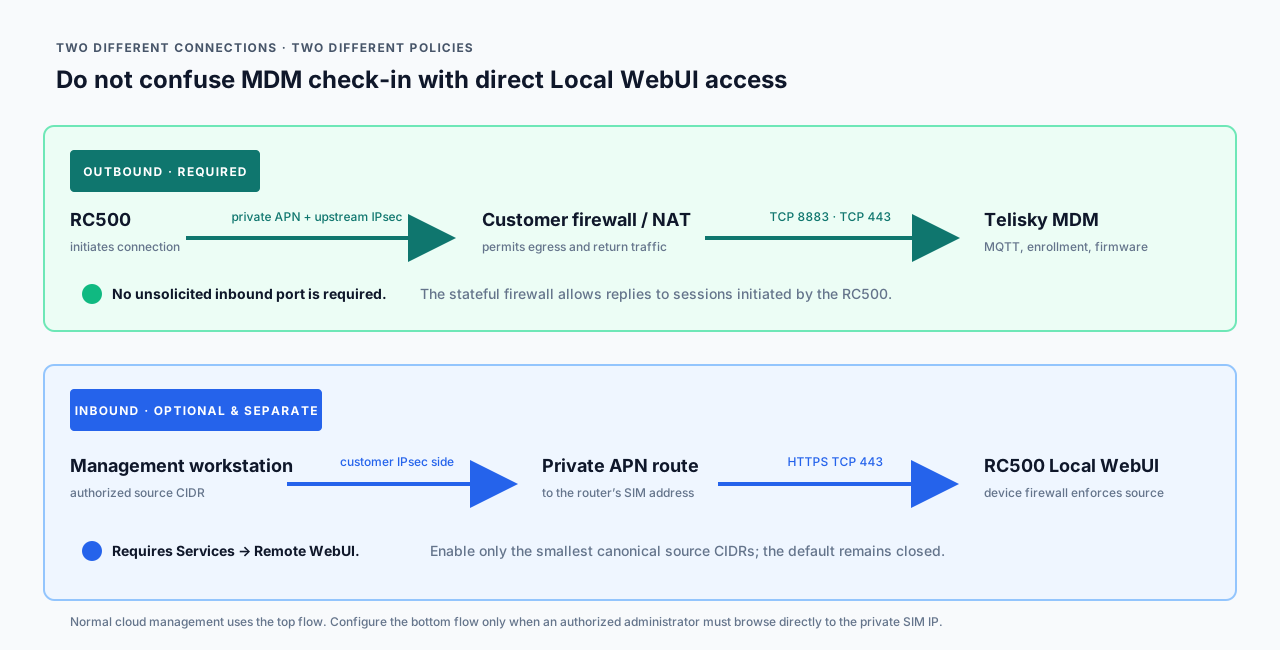
Keep these three paths distinct:
| Path | Direction | When customers use it | Firewall implication |
|---|---|---|---|
| Cloud MDM | Router → Telisky | Day-to-day monitoring, jobs, profiles, firmware | Outbound TCP 8883 and first-ask TCP 443 FQDNs from the SIM subnet. No inbound port to the router. |
| Local WebUI on site | Admin → router LAN | Install, recovery, or local status at http://192.168.4.1 | Allowed from the LAN by default. Cellular/WAN input stays closed, so the UI is not exposed on the private APN unless Remote WebUI is enabled. |
| Remote WebUI over the private APN | Admin → router cellular address | Optional browser access to the router through the private APN | Separate inbound HTTPS allowlist on the router. Disabled by default. |
For normal MDM connectivity, do not open inbound TCP 443 to the router.
If authorized administrators must browse directly to a router’s private SIM address, configure Remote WebUI access separately from MDM egress. The same guided control is available in:
- Local WebUI: Services → Remote WebUI
- Cloud: Router Settings or a configuration profile
Remote WebUI remains disabled by default and permits only HTTPS TCP 443 from explicit canonical source CIDRs (/16 through /32) on the cellular interface. It does not open HTTP 80, SSH, or other ports, and the page still requires the router’s local credentials. See also Cloud Portal vs Local Web UI.
Shipped-device and default limitations
Section titled “Shipped-device and default limitations”Plan around these product defaults before the field install:
- First check-in is required for portal presence. A powered router with a private SIM may not appear under Devices until MQTT check-in succeeds.
- Factory-prepared assignment still needs egress. Pre-assigned organization membership does not bypass DNS, NTP, MQTT, NAT, or FQDN allowlisting on the private APN path.
- Attach codes need the attach API path. If installers use a one-time code, the router must reach
mdm-api.telisky.comon TCP 443 as well as the MQTT broker. Continuous check-in does not requiremdm-api. Complete this guide before attaching a router. - Remote WebUI is off by default. Private-APN routing alone does not make the cellular address browsable. Local WebUI stays available on the LAN; cellular/WAN input remains closed until Remote WebUI is explicitly enabled.
- Secondary APN policy is optional and capability-gated. Some deployments keep ordinary internet on a primary APN and place only selected prefixes on a second APN. That is a different feature from “the whole SIM is on a private APN.” See Cellular & SIM and Router Settings.
- No customer-guided static-route UI for APN mesh designs. Carrier or customer routing policy owns SIM-to-SIM or LAN-prefix reachability across the private APN. Do not expect a general static-route form in guided cloud or local UI.
- Device-side IPsec is not the private-APN transport. Upstream carrier-to-customer IPsec is not configured on Services → IPsec.
Ordered setup checklist
Section titled “Ordered setup checklist”Complete these in order. Testing later steps before earlier steps are correct can hide the actual failure.
- Record the assigned networks. Obtain the private SIM/APN subnet, customer-side tunnel or interconnect interface, and public egress interface.
- Confirm the carrier path. IPsec selectors or interconnect routing must include every assigned SIM subnet in the correct direction.
- Confirm the decrypted route. The customer edge must route the APN subnet toward the intended internet firewall or service-breakout policy.
- Configure DNS. Permit the RC500’s configured resolver and verify it resolves
ingest-mqtt.telisky.com. - Configure time. Permit the configured NTP service and verify the router obtains a current clock.
- Create FQDN firewall objects. Add the Telisky names from the tables above; do not convert them into permanent IP objects.
- Allow MDM traffic. Permit TCP 8883 to the core broker and TCP 443 to the HTTPS destinations required by the deployment lifecycle and enabled features. Apply the rules to the private-APN source zone and subnet.
- Bypass TLS inspection. Exclude the Telisky FQDNs from certificate substitution or decryption policy.
- Enable source NAT. Apply NAT when the private APN exits to the public internet.
- Check MTU/MSS. Validate the effective tunnel MTU and clamp TCP MSS if required.
- Test one router. Prove one known SIM address before applying the policy to the full APN range.
- Confirm MDM state. Check that Last seen advances and the router becomes online in the correct organization.
Safe troubleshooting
Section titled “Safe troubleshooting”Stay on customer-visible evidence. Do not capture customer payloads, full packet bodies, or secrets.
On site or at the router
Section titled “On site or at the router”- Confirm power and whether the local Internet, Cellular, and Signal indicators look healthy.
- Open the local WebUI on the LAN when possible and check Network → Cellular for SIM status, APN, and whether the router shows a live address rather than an empty or down session.
- Confirm the configured APN string matches the carrier’s private or static APN.
- Check System → General for an obviously wrong clock if the UI shows time.
- Prefer a low-risk status refresh from the cloud after the path is fixed. Avoid factory reset, raw firewall edits, or support-only diagnostics unless Telisky Support asks for them.
At the customer edge
Section titled “At the customer edge”Use firewall session logs or packet capture summaries at the customer edge.
1. Confirm traffic arrives from the private APN path
Section titled “1. Confirm traffic arrives from the private APN path”Look for packets whose source is the test router’s private SIM address. If no packets arrive, check the carrier APN, IPsec security associations, traffic selectors, interconnect routing, and the return route before changing MDM rules.
2. Confirm DNS
Section titled “2. Confirm DNS”Verify the router’s configured resolver receives queries and returns addresses for:
ingest-mqtt.telisky.commdm.telisky.comcloud.telisky.comfleet.telisky.comA lookup from an administrator’s workstation is not sufficient if the RC500 uses different resolvers or policy.
3. Confirm time
Section titled “3. Confirm time”Verify UDP 123 leaves the APN zone and receives a reply. A severely incorrect clock commonly appears as a TLS or certificate failure rather than an NTP error.
4. Confirm MQTT
Section titled “4. Confirm MQTT”Look for an established stateful session:
<RC500-private-SIM-IP>:<ephemeral-port> → ingest-mqtt.telisky.com:8883The session should remain established or reconnect normally. Repeated SYNs without a SYN-ACK indicate routing or firewall failure. A completed TCP handshake followed by TLS alerts points to inspection, time, certificate, or MTU problems.
5. Confirm HTTPS when needed
Section titled “5. Confirm HTTPS when needed”During attachment, firmware, or remote-support operations, verify direct TCP 443 sessions to the applicable FQDNs. Do not require continuous HTTPS activity; MQTT is the normal persistent MDM channel.
6. Confirm the portal
Section titled “6. Confirm the portal”In Telisky MDM:
- Open the correct organization.
- Find the router by its approved inventory identifier.
- Confirm Last seen advances.
- Confirm the router changes to online after fresh MQTT contact.
- Run a low-risk status refresh before attempting a configuration or firmware job.
Symptom guide
Section titled “Symptom guide”| Symptom | Most likely area | Check next |
|---|---|---|
| Strong signal, but router shows no cellular IP or Cellular/WAN down | Bearer or APN provisioning | SIM plan, APN string, PDP/IP type, carrier activation; carrier portal IP alone is not proof |
| Cellular is connected, but no APN traffic reaches the customer edge | Carrier/APN or IPsec selectors | SIM subnet assignment, IPsec SA, encryption domains, carrier routing |
| APN traffic reaches the firewall, but no internet session is created | Routing or policy | Decrypted route, security zone, FQDN rule match, default/service route |
| TCP 8883 is allowed, but the source is private on the internet edge | NAT | Source-NAT rule order and egress interface |
| DNS queries time out | Resolver policy | UDP/TCP 53, configured resolver, return route |
| TCP connects, then TLS immediately fails | Time or TLS inspection | NTP, device clock, certificate-substitution policy |
| TLS starts but stalls or repeatedly resets | MTU/MSS | Path MTU, fragmentation feedback, MSS clamp |
| Ping works, HTTPS works from a laptop, router stays offline | Wrong source path or MQTT blocked | Test from the SIM subnet path; confirm ingest-mqtt.telisky.com TCP 8883 |
| HTTPS works, but the router remains offline | MQTT blocked | ingest-mqtt.telisky.com TCP 8883 |
| MDM works, but browsing to the private SIM IP fails | Separate inbound policy | Private-APN route plus Services → Remote WebUI source allowlist |
| Router appears under the wrong customer/site | MDM assignment | Organization and device attachment, not IPsec routing |
Copy-and-paste request for a network team
Section titled “Copy-and-paste request for a network team”Subject: RC500 private APN/IPsec requirements for Telisky MDM
Please provide controlled outbound internet egress for the RC500 privateSIM/APN subnet after it reaches the customer edge (for example aftercustomer-side IPsec decryption).
Required routing and security behavior:- Route the complete RC500 SIM/APN subnet from the private-APN/IPsec zone to the internet egress policy.- Apply source NAT at internet egress.- Permit stateful return traffic for connections initiated by the RC500.- Use FQDN-based destination objects; do not pin current destination IPs.- Bypass TLS/SSL inspection for the Telisky destinations.- Do not send MQTT through an HTTP proxy.
Required core service:- TCP 8883 to ingest-mqtt.telisky.com
Required first-ask HTTPS / OTA services:- TCP 443 to mdm.telisky.com- TCP 443 to cloud.telisky.com- TCP 443 to fleet.telisky.com- TCP 443 to ingest-mqtt.telisky.com
Optional lifecycle services:- TCP 443 to mdm-api.telisky.com when routers attach with a one-time code- TCP 443 to discovery.telisky.com only when remote-support discovery is used
Infrastructure services:- UDP and TCP 53 to the RC500's configured DNS resolvers- UDP 123 to the RC500's configured NTP servers
Please validate the tunnel path MTU and apply an appropriate TCP MSS clamp ifpath-MTU discovery does not work through the IPsec or private-APN service.
No unsolicited inbound port to the RC500 is required for normal MDM operation.Direct Local WebUI access is a separate policy and should not be enabled as partof this MDM egress request.
Test SIM/APN subnet: <SUBNET>Customer IPsec zone/interface: <ZONE_OR_INTERFACE>Internet egress interface: <INTERFACE>Customer change/ticket reference: <REFERENCE>When to contact Telisky
Section titled “When to contact Telisky”Stop local experimentation and contact support when:
- One test SIM has confirmed DNS, NAT, and TCP 8883 at the customer edge, but the router still never appears online.
- The router appears under the wrong organization or site.
- Attach codes fail after the private-APN allowlist is in place.
- A production site is at risk and further firewall or router changes could cause downtime.
- You are considering a factory reset, raw configuration recovery, or support-only modem diagnostics.
Information to collect before contacting support
Section titled “Information to collect before contacting support”- Customer or site name
- Private APN name and carrier
- Private SIM subnet; redact individual SIM identifiers unless requested securely
- Whether the carrier-to-customer IPsec SA or interconnect path is established
- Customer firewall vendor and software version
- Whether the design uses full-tunnel or restricted service breakout
- DNS and NTP services assigned to the routers
- Sanitized firewall decision logs for one test SIM address and the required ports
- Time and time zone of the test
- Whether TCP 8883 establishes and whether TLS inspection is bypassed
- Effective tunnel MTU or configured MSS clamp, if applicable
Do not send passwords, pre-shared keys, private keys, tokens, full SIM identifiers, packet payloads, or unredacted customer traffic in a support request.
Use Contact Telisky Support after collecting the list above. Related pages: