
Cellular & SIM
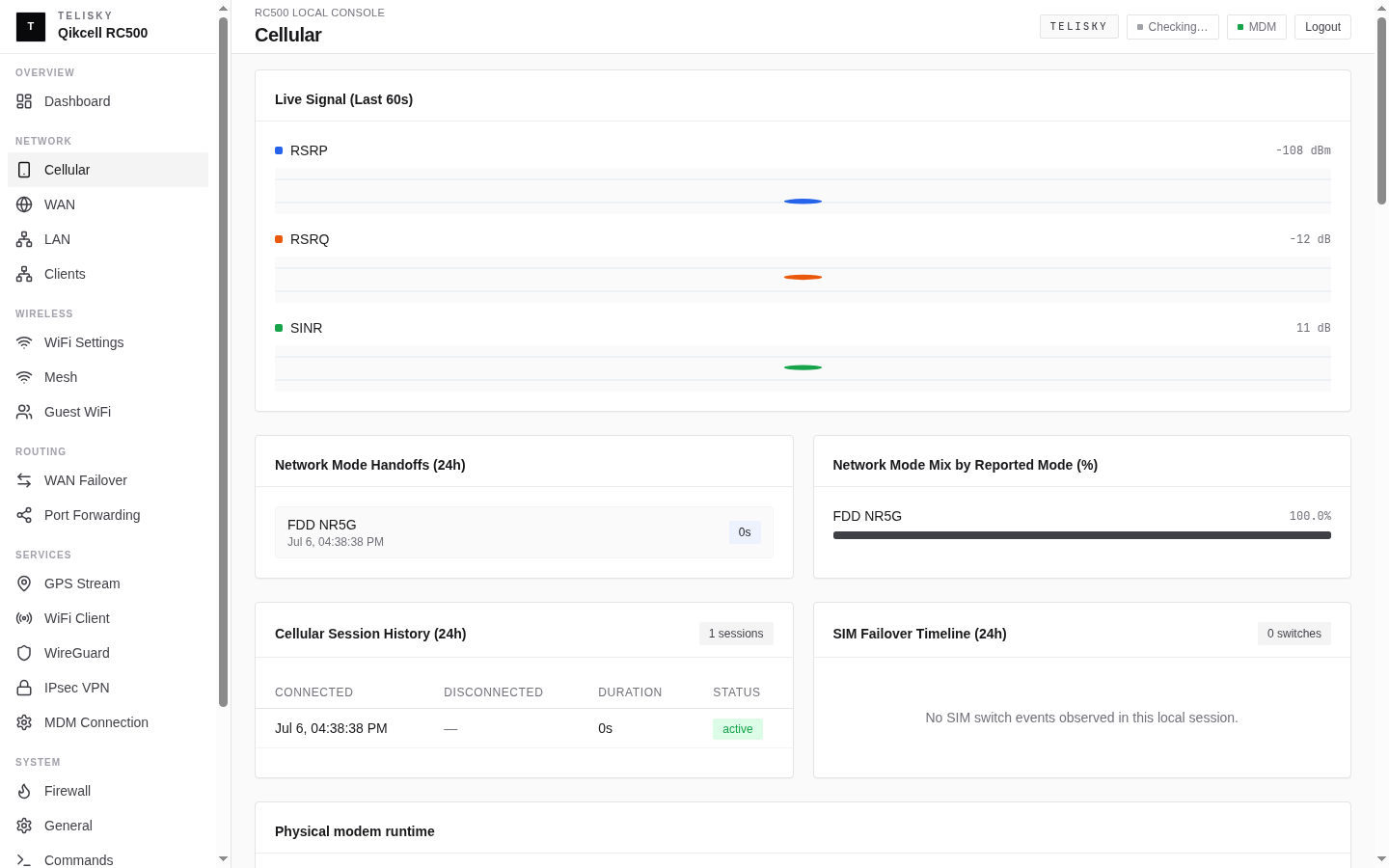
The RC500 has a cellular modem with two Nano SIM slots. Configure it under Network - Cellular.
SIM cards
Section titled “SIM cards”- SIM 1 - primary SIM
- SIM 2 - secondary SIM, used for failover when enabled
Choose the active SIM, or enable dual-SIM failover, on the Cellular page. Dual-SIM failover is off by default and must be turned on when you want it.
The APN tells the router how to connect a SIM to your carrier’s network. Many SIMs connect automatically. If cellular does not come up, set the APN manually:
| Field | Description |
|---|---|
| APN | The Access Point Name from your carrier |
| Username | Optional, only if your carrier requires it |
| Password | Optional, only if your carrier requires it |
| Auth type | None, PAP, or CHAP, as your carrier specifies |
| PDP type | IPv4, IPv6, or IPv4v6 |
The router may ship with a default APN set for one carrier. Set your own carrier’s APN if it does not connect.
Secondary APN policy
Section titled “Secondary APN policy”Some private carrier plans provide a second APN for a management network, private application, or other restricted service. A supported RC500 can connect that APN on the same modem while keeping its normal cellular connection active.
This is different from dual-SIM failover:
- Dual-SIM failover chooses which SIM supplies the cellular connection.
- Dual APN uses one active SIM and one modem to maintain a primary connection plus one secondary connection.
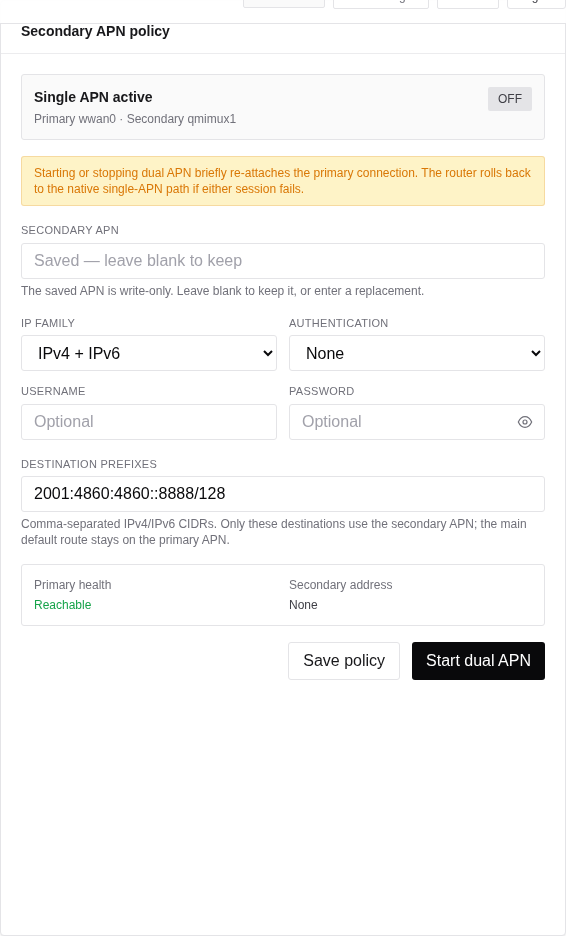
Use the secondary APN only when your carrier or Telisky deployment plan provides all of these details:
- Secondary APN name.
- IPv4, IPv6, or dual-stack service type.
- Optional username, password, and authentication type.
- The destination network prefixes that must use the secondary service.
To configure it locally:
- Open Network → Cellular.
- In Secondary APN policy, enter the APN and select the IP family and authentication type supplied by your carrier.
- Enter each destination as an IPv4 or IPv6 CIDR prefix, such as
10.40.0.0/16or2001:db8:40::/48. The prefix family must match the selected IP family. - Select Save policy.
- Select Start dual APN, review the warning, and confirm.
- Wait for Dual APN active, Primary health: Reachable, and Secondary address: Assigned.
Starting or stopping dual APN briefly re-attaches the primary cellular connection. The router tracks the operation as a job and restores native single-APN mode if the secondary connection or primary recovery check fails. Do not power off the router while the operation is running.
The APN and credentials are write-only: after saving, the page shows that values are stored but does not display them. Leave a write-only field blank to keep its saved value. Use Clear saved credentials before saving if the carrier no longer requires authentication.
To remove the secondary connection, select Stop dual APN and confirm. Wait for Single APN active and verify normal connectivity before leaving the site.
Signal quality
Section titled “Signal quality”The Cellular page shows live signal quality. Use this plain reading to judge a location:
| Quality | What it usually means |
|---|---|
| Excellent | Strong signal; best speeds |
| Good | Reliable for everyday use |
| Fair | Works, but may slow down under load |
| Poor | Unreliable; improve placement or antennas |
Exact signal values vary by carrier, band, and location, so treat the quality label as the guide rather than any single number. The page also shows detailed metrics (signal strength, band, and network type) that Telisky support may ask about.
SIM failover
Section titled “SIM failover”When enabled, the router can switch between SIM slots based on connection health and SIM availability, so the site stays online if one SIM loses service. Combine this with WAN failover for the most resilient connection.
Modem restart
Section titled “Modem restart”If cellular becomes unresponsive, use the modem restart action on the Cellular page and wait for the modem to re-register before changing other settings.
Speed tests and optimization
Section titled “Speed tests and optimization”When cellular is connected, the local Web UI may offer a speed test and guided speed optimization. Use these during setup or troubleshooting, not during customer-critical traffic windows. They can consume mobile data and may briefly reconnect cellular while testing radio profiles.
Modem diagnostics
Section titled “Modem diagnostics”If Telisky Support needs deeper cellular evidence, use Device services → Modem diagnostics in the local Web UI to capture a redacted support bundle. Send it only through the approved support channel. Do not post raw modem logs, SIM identifiers, or location evidence in public channels.
Modem firmware
Section titled “Modem firmware”The cellular modem has firmware separate from the router. Router firmware and cellular modem firmware are updated separately when those workflows are available. See Firmware Updates.